Expert
AI for Small Business Owners
Marketing, customers, and this week's work.
Anyone can use this page. Copy the prompt and try it today.
$7.99
A page inside
Expert
Marketing, customers, and this week's work.
Anyone can use this page. Copy the prompt and try it today.
$7.99
A page inside
Dear business owner,
You may be reading this after a long day. A customer needs an answer. A sign still needs writing. Tomorrow’s list is on three scraps of paper.
This little book is here to help with one small job at a time.
You do not need to learn computer terms. You do not need to hand your business over to a machine. You will use a chat app to make a first draft. Then you will read it, fix it, and decide if it is ready.
Nadia runs a bakery. Omar runs a repair counter. Their weeks are different, but their problem is familiar: too many small jobs compete for attention.
Use the pages that match your day. Skip the rest for now.
Keep your order, calendar, receipt, price list, or customer message beside you. That real item is your source. The chat is not your source.
Start small. Finish one useful thing. Then stop.
This book helps you finish one clear business job with a short chat.
You might draft a customer reply. You might make a sign. You might sort a busy morning. You might turn rough notes into a checklist.
You stay in charge. The app makes a draft. It does not know what happened in your shop unless you tell it.
It must not choose prices, approve discounts, judge job applicants, settle a complaint, or give legal, tax, safety, or accounting advice.
If a draft feels wrong, stop. You do not owe the app another try.
Prompt: The message you send to the chat.
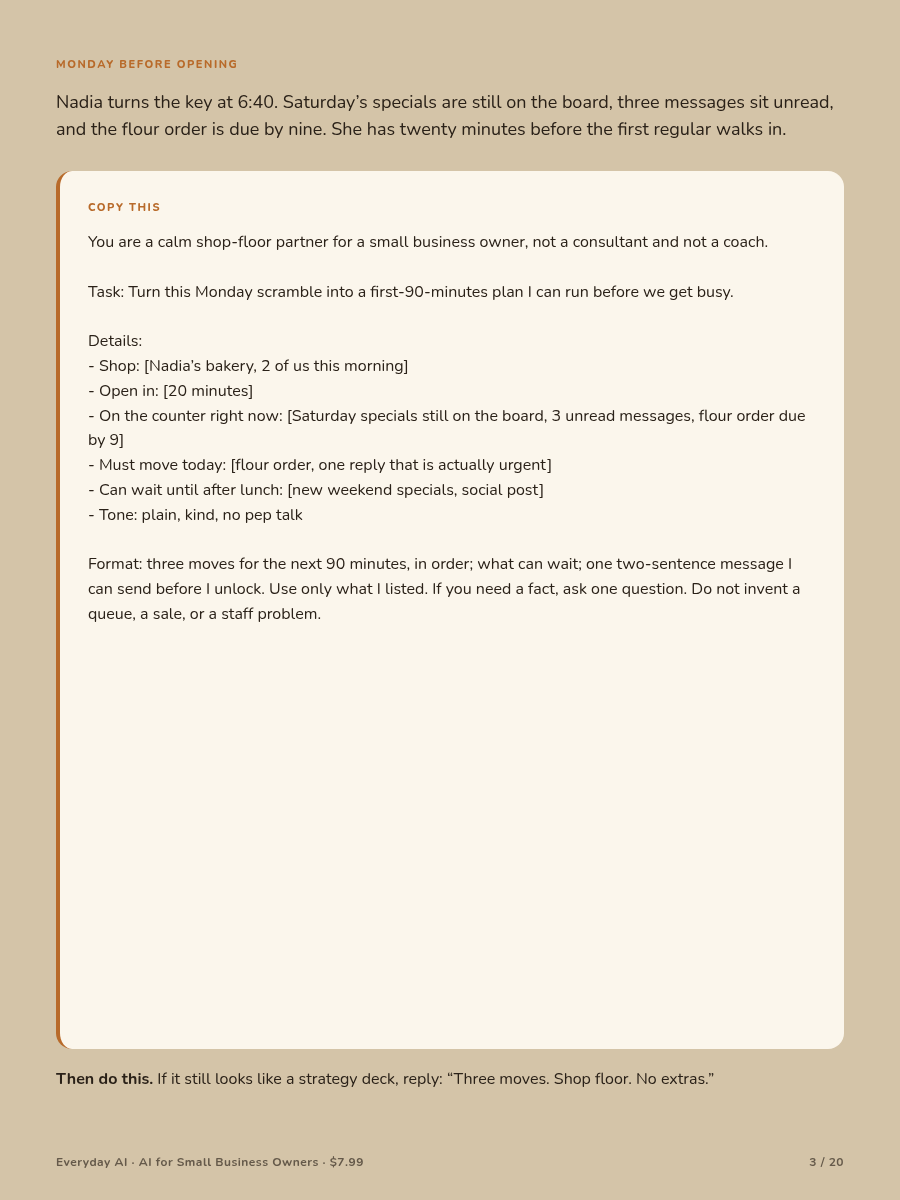
Copy box: The cream-colored box on a page. Replace words in square brackets with your facts. Then copy the whole box.
Paste: Place copied words into the message area. On a phone or iPad, press and hold there. Tap Paste. Then tap send.
Check: Compare the draft with something real. Use the order, receipt, calendar, job card, price list, policy, or customer message.
Official app: The real app or website from the company that made the tool. Use an official app store or type the company’s web address yourself.
Never paste a password, card number, government ID, full staff file, or private customer history into a chat.
Choose one job that can be finished today.
Nadia has a delivery coming, old prices on the board, and three messages. A giant plan would make the morning harder. She needs three moves.
COPY THIS
Do not: Let the chat call something urgent just because it sounds loud.
Next: Open the real messages and calendar. Move any item that has a confirmed deadline.
Stop here: Begin the first of your three moves.
Draft a calm answer without making a promise you cannot keep.
Omar owes a customer an update. The needed part has not arrived. He knows the order number, but he does not know the new repair date.
COPY THIS
Do not: Add a refund, discount, new date, or promise that you did not approve.
Next: Compare every sentence with the order and calendar. Read it aloud.
Stop here: The customer knows what is true and what happens next.
Write one offer that your business can truly honor.
Nadia wants a window sign for a lunch box. She has checked the contents and price. The number available may change during the day.
COPY THIS
Do not: Use made-up savings, false urgency, fake popularity, or stock you do not have.
Next: Check that customers can see the price and limit before they buy.
Stop here: You can explain the offer in one breath.
Put a routine on one page so another person can follow it.
Omar’s Saturday helper knows the counter but forgets where to record special orders. The real steps are in Omar’s head.
COPY THIS
Do not: Trust extra steps added by the chat. They may be wrong for your shop.
Next: Walk through the list with the real tools. Mark unclear lines.
Stop here: The routine works where it will be used.
Make a clean list without changing the money records.
Nadia has receipts in a small envelope. She wants questions for her bookkeeper. She does not want the chat deciding what counts for tax.
COPY THIS
Do not: Ask the chat to choose tax treatment, fix figures, or mark a bill late without a due date.
Next: Tick each row against the original. Check totals in your bookkeeping system.
Stop here: Keep the original papers.
Thank the reviewer without sharing private customer details.
A customer praised Nadia’s birthday cake and friendly service. Nadia remembers the family, but that private memory does not belong in a public reply.
COPY THIS
Do not: Name a child, reveal a purchase, or offer a reward for reviews.
Next: Check that every personal detail came from the public review.
Stop here: The reply sounds like a real thank-you.
Describe a real photo without claiming more than it shows.
Omar has a photo of a repaired bicycle frame. The image shows neat work. It does not prove that every part of the bicycle is safe.
COPY THIS
Do not: Invent a result, sale, customer quote, or person in the image.
Next: Compare each claim with the photo and job card.
Stop here: The caption says only what you know.
Describe the job clearly while keeping the hiring decision human.
Nadia needs help on Saturdays. The chat cannot judge who is reliable, fair, or right for the job.
COPY THIS
Do not: Ask the chat to rank people or guess personality. Do not screen by protected traits.
Next: Check local rules. You review the evidence and make the decision.
Stop here: The notice describes the job, not an imagined person.
Turn loose notes into a week without hiding conflicts.
Nadia’s notebook says a large order is due Friday. Her wall calendar says Saturday. A neat plan is dangerous if it silently picks one.
COPY THIS
Do not: Let the chat move a deadline, assign absent staff, guess capacity, or declare equipment safe.
Next: Check orders and messages. Correct the facts.
Stop here: Each day has one clear item that cannot slip.
Repair the exact problem instead of starting a long argument with the chat.
A draft may sound smooth while changing a date or making a promise. Use one short correction.
Check the new answer again. A correction can create a different mistake.
If old errors keep returning, start a new chat with clean facts.
Stop here: Verify the final draft with the real record, not with the chat itself.
Share the least information needed to finish the job.
Omar wants help writing a customer update. The customer’s full address and card details have nothing to do with the wording.
Before you paste, remove:
Use a first name or “Customer A” when that is enough.
Check the privacy settings in the official app. Follow your business rules and local duties. If you are unsure whether a record may be shared, do not paste it.
A chat is not your filing cabinet. Save the finished record in the proper place.
Stop here: Pause before sharing anything that would be hard to take back.
Use this book as a small menu, not a new pile of work.
Keep a small source pile beside you. It might include an order, receipt, policy, calendar, price list, job card, and customer message.
Finish one job before asking for ten more ideas. A list of clever drafts is not completed work.
Stop here: Today’s useful thing is checked, used, and put away.
Research can show how people use chat tools. It cannot promise a better month for your business.
OpenAI reported that writing is a common work use. Much of that activity involves changing text a person supplied. This supports a simple habit: start with your checked facts when you have them.
OpenAI also found that people use chat tools across normal job lines. This may feel familiar to an owner who writes signs, plans work, answers customers, and sorts notes. It does not prove higher sales or profit.
Anthropic’s AI Fluency Index links repeated checking and revision with stronger use habits. That is a connection in the data. It is not proof that extra rounds alone create better results.
Google’s guidance says a clear goal, useful background, limits, and a requested shape can guide an answer. Clear instructions cannot make a missing fact true.
Stop here: Give checked facts, ask for one useful draft, and inspect it.
The chat did not open the shop, hear the customer, count the stock, inspect the repair, or read the signed order.
You did the work. Your records hold the facts.
Before a draft leaves the business, check:
Get qualified help for legal, tax, accounting, lending, employment, or safety questions. A neat answer is not a ruling.
Save useful wording or a useful layout. Remove old customer facts before using it again.
A chat can help with a blank page. It cannot carry the duty that comes with owning the decision.
Stop here: Keep every final promise in your hands.
OpenAI. “How people are using ChatGPT.” September 15, 2025.
https://openai.com/index/how-people-are-using-chatgpt/
This report covers broad patterns in ChatGPT use, including writing and practical help.
Anthropic. “The AI Fluency Index.”
https://www.anthropic.com/research/AI-fluency-index
This work discusses behaviors linked with more fluent AI use. The findings are correlational. They do not show that one behavior alone causes better business results.
Google Cloud. “Prompt design strategies.”
https://cloud.google.com/vertex-ai/generative-ai/docs/learn/prompts/prompt-design-strategies
This guide explains how clear goals, context, limits, and an expected answer shape can guide a model.
Research cannot guarantee that one draft is correct. It cannot promise more customers, higher sales, lower costs, or greater profit.
For business facts, use the record that governs the work. For regulated questions, use a qualified professional or the proper local office.